Supplier Guide (CN/HK): Overview
If you are a supplier outside Brazil, this guide explains how to create BRL payment links, track the resulting CNY balance, withdraw CNY, use the original order flow for eligible refunds, and keep evidence that reduces disputes and fraud.
How to use this series
- Start with Getting paid (Payment links) to create a link and understand statuses.
- Then read CNY Withdrawals & Order Refunds to plan CNY cash flow and understand the order-bound Pix refund.
- Complete KYC/KYB as early as possible — it is required to receive payments — to avoid blocks.
- Before scaling, review Disputes and standardize what evidence you keep.
- Finally, review Guarantees/Reserved balance and Fraud Prevention to reduce holds and losses.
Typical workflow (in 1 minute)
This is the most common flow for CN/HK suppliers receiving from Brazil:
- Create a Payment link in BRL for your Brazilian customer.
- Ask the payer to use Pix and confirm the payment inside ByteMax (not only screenshots).
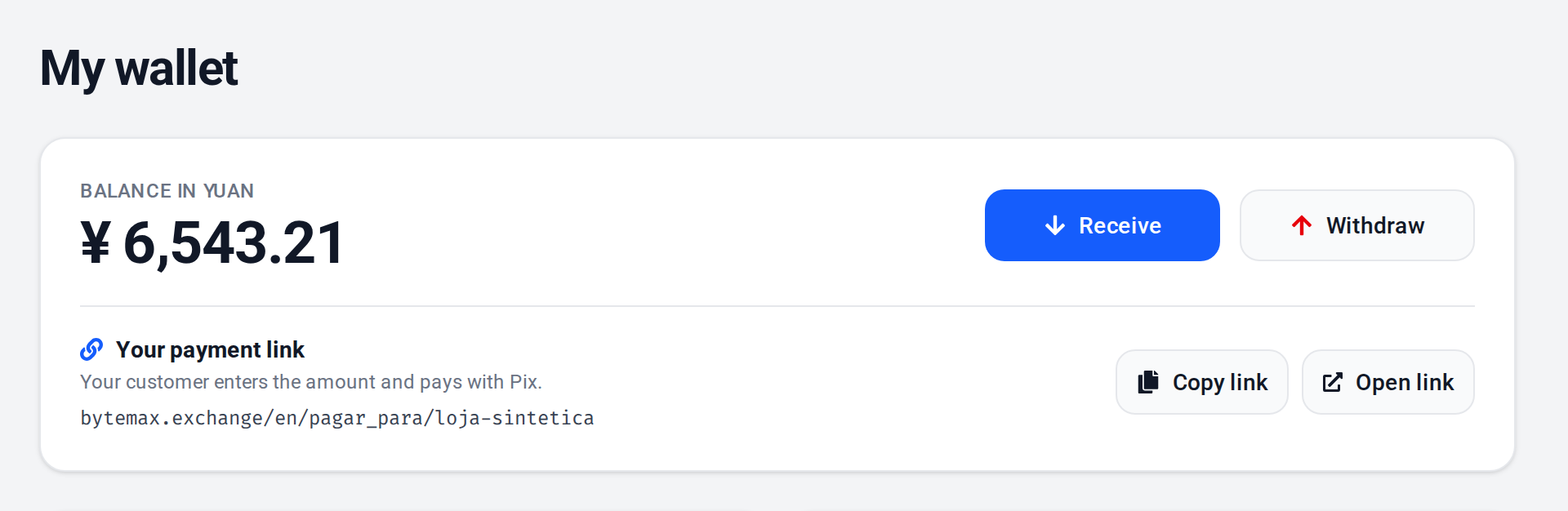
- Check the transaction in your Wallet and save the Order ID / Payment ID for reconciliation.
- Withdraw CNY when needed; for an eligible refund, use only the action on the original order.
- If a dispute happens, respond fast with minimal, well-organized evidence (use UTC + BRT timeline).
Quick glossary
- Wallet
- Where you track your balance in yuan and your transactions, receive payments, withdraw yuan and refund payments.
- Payment links
- Links generated on ByteMax so a Brazilian payer can pay via Pix in BRL.
- Order ID
- ByteMax internal identifier for the operation; shown in Wallet and on the order page.
- Payment ID
- Identifier used for reconciliation and support; usually shown on the payment link/page.
- Dispute
- Process to resolve a disagreement; it can keep funds reserved until a decision.
- KYC/KYB
- Identity/Business verification (individual/company) — required to receive payments.
Articles in this series
Incoming paymentsHow to generate a link, share it with your customer and confirm the payment.CNY withdrawals and order refundsHow to withdraw CNY and refund a payment through its original order.KYC/KYBHow to complete identity (individual) and business verification.DisputesHow to respond, what evidence to upload and how to prevent disputes.GuaranteesWhy funds can be held and how refunds work.Fraud preventionA practical checklist to reduce fraud risk.
FAQ
- Is KYC/KYB required to receive payments?
- Yes. To receive payments, ByteMax requires KYC (individual) or KYB (business), in any country. Until verification is approved, the Receive button in your Wallet is unavailable.
- How do I confirm a payment safely?
- Confirm it on the payment page and in your Wallet on ByteMax. Avoid releasing goods/services based only on bank app screenshots.
- Where can I see the payer name and document?
- When available, the payer's name and masked CPF/CNPJ appear on the payment's row in your Wallet and on the payment's page, under “Paid by”. Use them only for reconciliation and fraud prevention.
- Where do I check limits and fees?
- The ByteMax UI shows minimums, limits, and fees for each available flow. If a rule blocks an action, send support the Order/Payment ID and the displayed message.
1 / 7 Start: Payment links
Need help? Contact ByteMax support
If something differs from what you see on screen, follow what the screen shows and send these details to speed things up.
- Payment/Order ID (e.g., PAGAMENTO-000123 or ORDEM-000123).
- Approximate date & time (include timezone: UTC or BRT (UTC-3)).
- Amount, currency (BRL/CNY) and the status shown.
- Screenshots without unnecessary sensitive data (keep the ID visible).
- If there's a dispute: 1 or 2 chat screenshots showing the agreement and the relevant receipts.