Guarantees, Holds and Reserved Balance
In some scenarios (for example, a dispute, security validation or risk rules), part of the value can be reserved/blocked temporarily. This protects both sides while the case is analyzed. As a CN/HK supplier, plan your cash flow with a buffer and always monitor your Wallet.
How it works
- Reserved funds are not available for withdrawal until the hold is removed.
- Holds can happen due to disputes, security validations, or risk rules.
- Reserved funds are taken out of your Balance in yuan and return to it if the reserve is released. While a reserve lasts, your Wallet shows the reserved amount below the balance.
- Keep a cash buffer, especially in CN/HK ↔ BR operations where delivery timelines can be longer.
- Plan your cash flow: retention can happen more often in international operations (CN/HK ↔ BR) due to delivery time and time zones.
- If you see a lock with no clear reason, contact ByteMax support with the order/payment ID and minimized screenshots.
Refunds
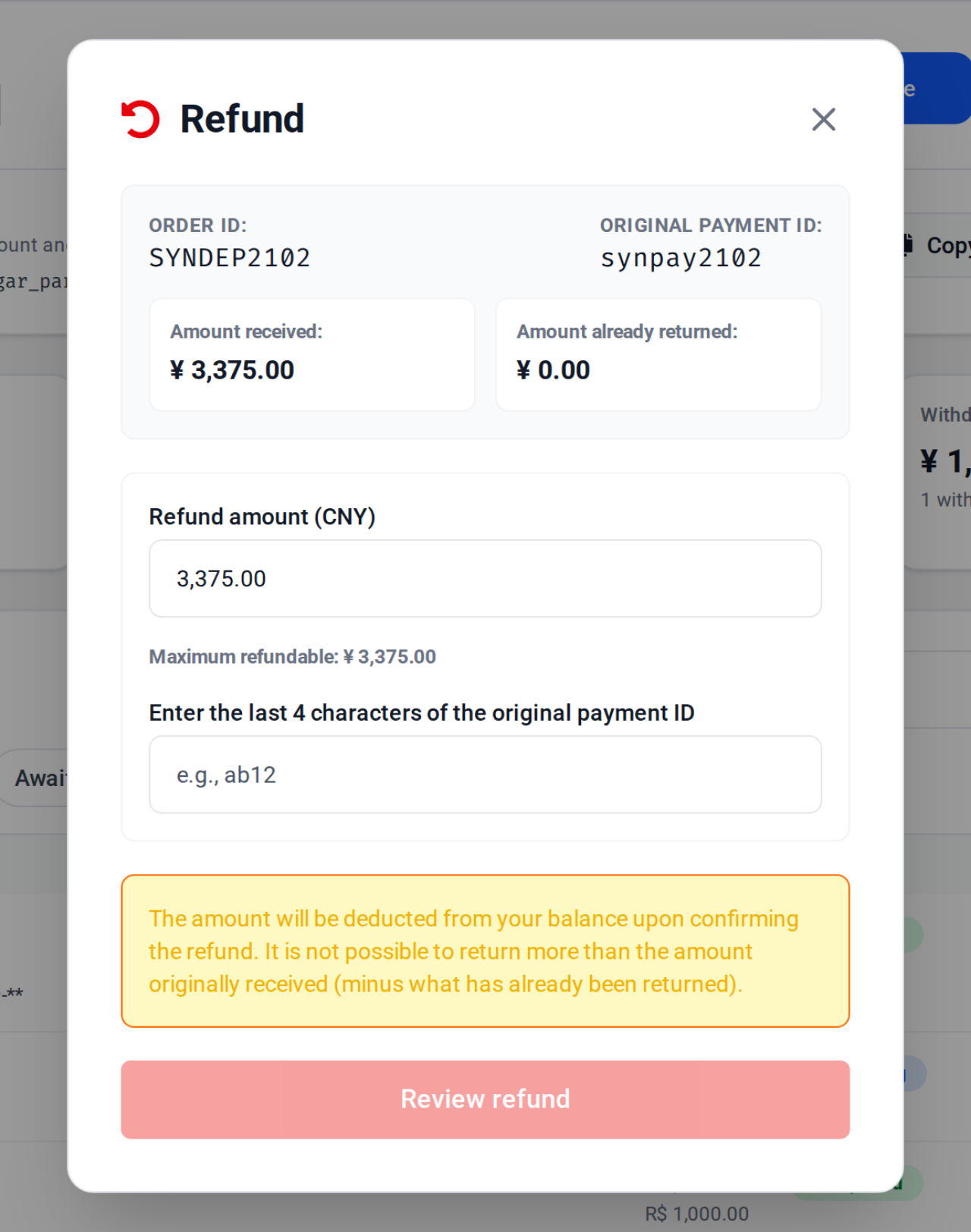
- In your Wallet, click Refund on the payment's row (the button appears only on completed payments the provider can reverse).
- Enter the refund amount (up to the maximum allowed by the UI).
- Type the last 4 characters of the original payment ID (example: PAGAMENTO-000123 → 0123).
- Click Review refund, check it and click Confirm refund. The refunded amount is deducted from your balance and goes back to the Pix account that paid.
- Follow it in your Wallet: the payment's row shows the refunded amount and the status Partially refunded or Refunded.
- Finish the refund and keep a written record of the agreement with the payer.
Best practices
- Reply to disputes quickly and send well-organized, readable evidence.
- Keep KYC/KYB completed and your account data updated (required to receive payments).
- Keep written records of what was agreed (price, deadline, delivery) and save Order/Payment IDs.
- Avoid last-minute changes and third-party deliveries without explicit confirmation.
- If you choose to refund, document the agreement with the payer and keep the IDs for traceability.
- Before refunding, verify the payer details (name/CPF/CNPJ) match the order to reduce fraud risk.
Frequently asked questions
- Why is part of my balance reserved?
- Most commonly due to a dispute, security validation, or risk rule. Check the disputes you received on the Disputes page and your notifications.
- Can I withdraw reserved balance?
- No. Only available balance can be withdrawn. Reserved funds are released after the underlying reason is resolved.
- When does it make sense to refund?
- If there was a pricing mistake, cancellation, or an agreement with the payer to resolve an issue. Always document the agreement and keep the Order/Payment IDs.
- How can I reduce retention risk?
- Reduce disputes with clear policies and solid evidence, deliver only after confirmation, and keep your KYC/KYB and account data updated.
Need help? Contact ByteMax support
If something differs from what you see on screen, follow what the screen shows and send these details to speed things up.
- Payment/Order ID (e.g., PAGAMENTO-000123 or ORDEM-000123).
- Approximate date & time (include timezone: UTC or BRT (UTC-3)).
- Amount, currency (BRL/CNY) and the status shown.
- Screenshots without unnecessary sensitive data (keep the ID visible).
- If there's a dispute: 1 or 2 chat screenshots showing the agreement and the relevant receipts.